
Detailed lists on new features for the past four releases can be found in the What's new
section.
Here you get a brief overview on the most current version , i.e. release 2025.
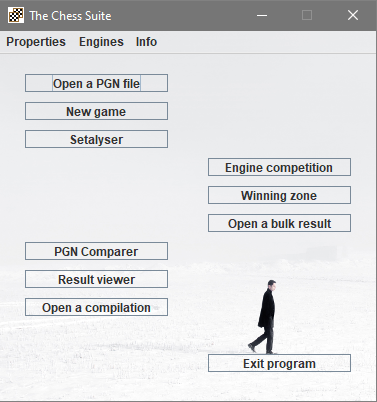
This is the layout of the start window since release 2024 (the 2025 release has an additional Tools menu).
The most important item is of course Open a PGN file, because a wide range of functions require a PGN file first.
Single games, fragments and positions are created, analysed and recorded by means of the well-known game browser opened by New game button and the revised and improved Setalyser.
The PGN Comparer, the Result Viewer and the button Open a compilation have been grouped together, as it is logical.
On the right there is the option to start an Engine competition. Here thematic matches and tournaments between UCI engines can be created, stopped and resumed easily.
Those who know an older release may think, that Winning zone is a new function, but it was called Vary a position some years before. The old name was hard to understand while the new one is quite an understatement.
Below that you find the well-known Open a bulk result button.
The new Tools menu contains some menu items which were previously in the Info -> Experimantal section.
Open a FEN file opens a textfile having FEN string in its lines and creates for each such FEN a PGN game with the FEN position as starting position. Merge PGN files allows you to merge the games from many PGN files into one. Therefore yo have to copy all PGN files into one directory and select this directory for the merge. The result can be saved as a PGN file. Show a NAG table helps you to commentate with NAGs.
The menu item Multi document interface was moved from the Info to Properties.
If you have already used an earlier release, then I recommend reading What's new next.